
Setting up earnings
builder fee, Pro plan, referral link.
THESIS is revenue-ready: three mechanisms exist in the code, and all of them ship switched off with empty addresses. Nothing is earned until you turn one on. Your server never holds funds or keys for any of them.
01The three mechanisms
| Mechanism | How money moves | Admin section |
|---|---|---|
| Builder fee | A small fee on the notional of orders the desk sends on Hyperliquid, approved once by each user. Hyperliquid credits it to your builder address. | Money → Builder fee |
| Pro plan | Users pay USDC on Hyperliquid from their own wallet to your address; more AI chart reads per day. | Money → Plans |
| Referral link | Your own Hyperliquid referral link, shown with a disclosure. Hyperliquid pays referral rewards to the account that owns the code. | Money → Referral link |
A fee on automatically executed trades may be regulated where you or your users are. The Pro plan (a fee for AI usage) and running the desk for your own account are the simpler cases. Take legal advice before charging the public. No revenue is promised: it depends entirely on your users.
02Builder fee
- Prepare the builder addressA Hyperliquid account you control, with at least 100 USDC of perps account value (a Hyperliquid requirement for builders). Status → Builder address holds ≥ 100 USDC perps value checks it.
- Set the feeAdmin → Builder fee: Set address, then the fee in tenths of a basis point, as Hyperliquid counts it.
10= 1 bp = 0.01 %. The hard cap is100= 0.1 %, the Hyperliquid maximum for perps. - Turn it onSwitch Charge a builder fee on and save. It only takes effect when both the address and a fee above 0 are set.
What users see: when they connect a wallet for a live run, the wallet asks them to Approve the desk fee (Hyperliquid approveBuilderFee) with the rate shown. The fee is also added to backtest costs, so the numbers they test already include it.
Getting paid: the fee accrues as builder rewards on Hyperliquid, and you claim them there. Revenue in the admin counts a claim only after it happens, with its ledger hash; unclaimed rewards are shown as a detail, never as revenue.
03Pro plan
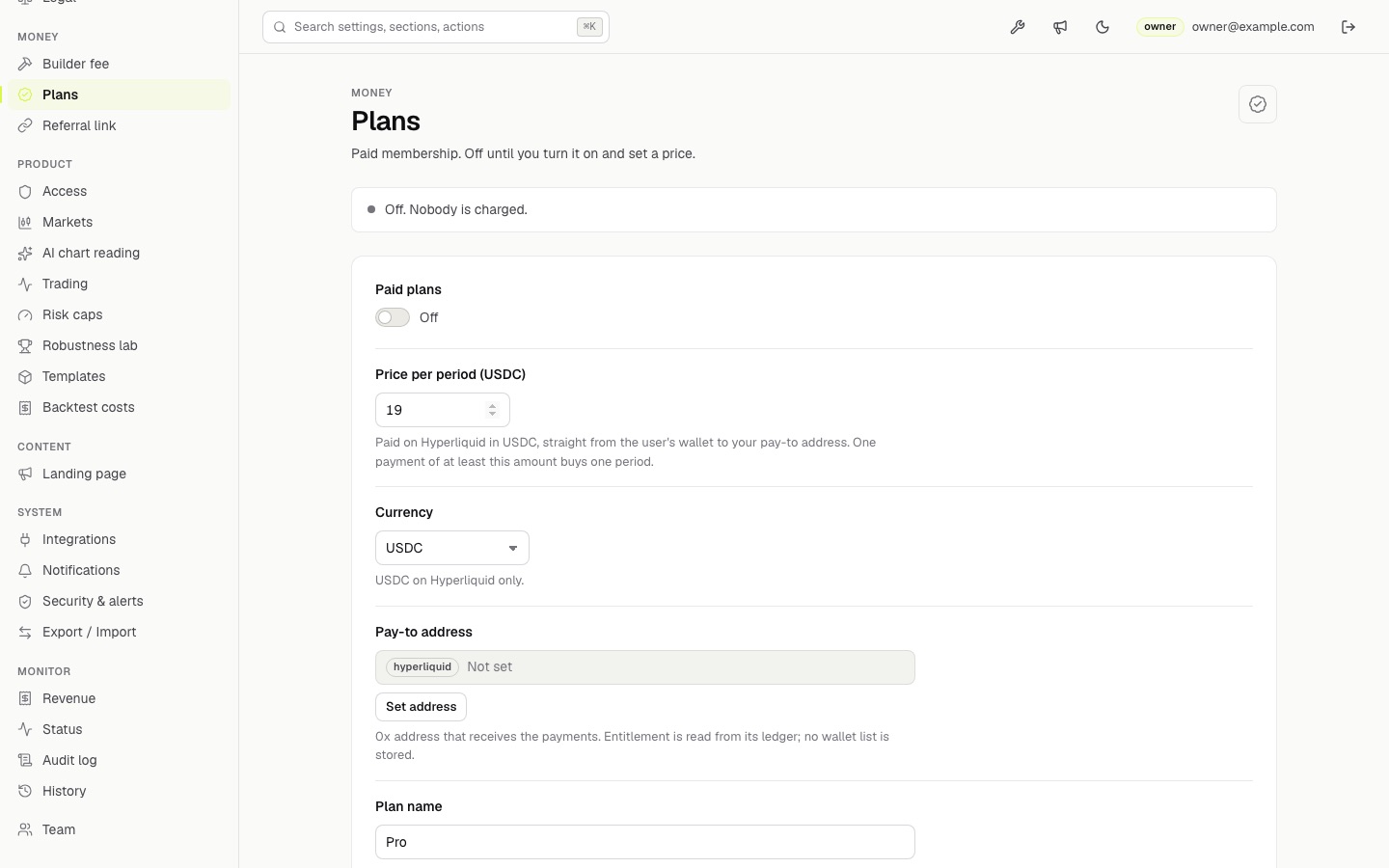
| Field | Meaning |
|---|---|
| Paid plans | On/off. Off by default. |
| Plan name | Up to 30 characters, for example Pro. |
| Price per period (USDC) | What one payment must be at least. 1 – 100,000. |
| Pay-to address | Your Hyperliquid 0x address that receives payments. |
| Period (days) | What one payment buys, 1 – 366. A payment while still Pro extends from the current end. |
| AI chart reads per day | Separate limits for free visitors (0 – 1,000) and plan members (1 – 10,000). |
| Perks | Up to 8 lines shown on the plan card. |
- Prepare the pay-to addressA Hyperliquid address you control. Payments arrive there as USDC transfers on Hyperliquid.
- Fill the sectionAdmin → Plans: Set address for the pay-to address, then price, period, plan name, daily AI chart reads for free visitors and plan members, and perks.
- Turn it onSwitch Paid plans on and press Save changes. The plan is live only when it is on and a pay-to address is set; otherwise the desk treats plans as off.
- Check itReload the landing page: a pricing section appears. The desk shows the plan to users who reach the free daily limit.
The Pro plan sells more AI chart reads per day, so it only makes sense with an Anthropic key set (AI key). While plans are on, free visitors get their own daily limit (default 3 reads) instead of only the hourly limit.
How a user upgrades: they send USDC on Hyperliquid (usdSend) from their wallet to your address, then sign a plain-text sign-in message. The server checks the signature and reads your address's Hyperliquid ledger (cached for 60 seconds) to find the payment. No wallet list is stored; the entitlement is derived from the ledger each time.
04Referral link
- Get your codeFrom your Hyperliquid account. The link looks like
https://app.hyperliquid.xyz/join/CODE; the admin accepts only that form. - Fill the sectionAdmin → Referral link: the link, the disclosure text (a sensible default ships), then Show the referral link on.
Referral rewards are paid by Hyperliquid under its own programme terms. THESIS only shows the link and does not record who used it.
05Revenue calculator
The landing page's For operators section has a small calculator titled Your numbers, your arithmetic. Every field starts empty and nothing is pre-filled; it only does the arithmetic on numbers the visitor types:
| Input | Used for |
|---|---|
| Monthly live volume through your desk (USD) | Builder fees = volume × bp ÷ 10,000 |
| Builder fee (bp, 1 bp = 0.01 %, max 10) | Same formula |
| Paying Pro users, plan price per month (USDC) | Plan revenue = users × price |
| Your AI cost per month (USD, from your Anthropic bill) | Subtracted from the total |
The result is labelled Per month, before your hosting (builder + plan − AI cost). It is not a forecast and it does not know your real volume or users. The realised figures are in Admin → Revenue. To hide the calculator, switch off Show the "for operators" section under Landing page.
06White label
Your brand name, colour, logo, landing copy and FAQ are all set in the admin (Rebranding). What you charge your own clients for a hosted desk is up to you and your licence (Licence).